Yep, we may get a tiny thank-you (read: commission) when you buy through links on Techspotr — not enough for a yacht, but enough to keep the lights (and servers) on. Learn more
49 Highlights 100 Differences 0 Reactions 0 Likes
Crossbeats LumeX Vista Facts: 140 Specifications & 49 Highlights
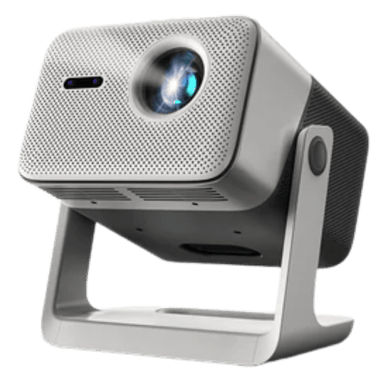
Still comparing projectors? The Crossbeats LumeX Vista might just be the better pick. It offers 140 specs & features — including general information, optical performance, projection & throw performance & lens & focus system you’ll actually use.
A fast snapshot of the Crossbeats LumeX Vista, covering its standout specification and what you can expect right out of the box.
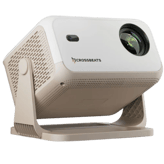
Crossbeats LumeX Vista
Crossbeats LumeX Vista features 1,200 ANSI lumens, native 1080p resolution with 4K HDR support, and a fully sealed optical engine, providing a dust-free, high-brightness cinema experience up to 300 inches.
Specifications & Facts 140
Specs measured. Drama avoided.
Smart shoppers look at more than specs. We break down the Crossbeats LumeX Vista projector by price, pros and cons, and how it compares with other top-rated projectors. Join the crowd!
General Information 9
Crossbeats LumeX Vista Color
What is the color of this projector?
49 Crossbeats LumeX Vista 0 Votes Gray
35 Projectors in this range Black
Crossbeats LumeX Vista
The product color is gray, which offers a neutral and modern aesthetic suited for varied environments.
Indicates the color finish of the projector body.
When it comes to Color, Crossbeats LumeX Vista ◉ is better than Projector in this range ◉ , delivering higher 14 score measurement.
Don’t keep it to yourself — be the first to react and review the Color on Crossbeats LumeX Vista ◉ and help others decide!
Crossbeats LumeX Vista Imaging Chip Type
What is the imaging chip type of this projector?
29 Crossbeats LumeX Vista 0 Votes LCD Panel
45 Projectors in this range DLP Chip
Crossbeats LumeX Vista
The imaging chip type used is an LCD panel, which generally provides good color accuracy and sharpness.
Indicates the chip architecture that forms the image.
When it comes to Imaging Chip Type, Crossbeats LumeX Vista ◉ is worse than Projector in this range ◉ , delivering equal 16 score measurement.
Don’t keep it to yourself — be the first to react and review the Imaging Chip Type on Crossbeats LumeX Vista ◉ and help others decide!
Crossbeats LumeX Vista Imaging Chip Size
What is the imaging chip size of this projector?
0.47 inch 0Votes
0.55 inch (Average)
Crossbeats LumeX Vista
The imaging chip size is 0.47 inch (1.19 cm), a typical size for projectors balancing resolution and brightness.
Specifies the size of the imaging chip. Larger chips generally improve performance.
When it comes to Imaging Chip Size, Crossbeats LumeX Vista ◉ is worse than Projector in this range ◉ , delivering equal 0.1 inch measurement.
Don’t keep it to yourself — be the first to react and review the Imaging Chip Size on Crossbeats LumeX Vista ◉ and help others decide!
Crossbeats LumeX Vista Product Type
What is the product type of this projector?
44 Crossbeats LumeX Vista 0 Votes Portable, Home Theater
32 Projectors in this range Home Theater
Defines the general classification of this projector.
When it comes to Product Type, Crossbeats LumeX Vista ◉ is better than Projector in this range ◉ , delivering higher 12 score measurement.
Don’t keep it to yourself — be the first to react and review the Product Type on Crossbeats LumeX Vista ◉ and help others decide!
Crossbeats LumeX Vista Release Year
What is the release year of this projector?
99 Crossbeats LumeX Vista 0 Votes 2025
65 Projectors in this range 2023
Shows the year the projector model was released.
When it comes to Release Year, Crossbeats LumeX Vista ◉ is better than Projector in this range ◉ , delivering higher 34 score measurement.
Don’t keep it to yourself — be the first to react and review the Release Year on Crossbeats LumeX Vista ◉ and help others decide!
Crossbeats LumeX Vista Build Material
What is the build material of this projector?
29 Crossbeats LumeX Vista 0 Votes Plastic
22 Projectors in this range Plastic
Specifies the main construction material of the chassis.
When it comes to Build Material, Crossbeats LumeX Vista ◉ is better than Projector in this range ◉ , delivering higher 7 score measurement.
Don’t keep it to yourself — be the first to react and review the Build Material on Crossbeats LumeX Vista ◉ and help others decide!
Crossbeats LumeX Vista Country of Manufacture
What is the country of manufacture for this projector?
49 Crossbeats LumeX Vista 0 Votes China
36 Projectors in this range China
Indicates where the projector was manufactured.
When it comes to Country of Manufacture, Crossbeats LumeX Vista ◉ is better than Projector in this range ◉ , delivering higher 13 score measurement.
Don’t keep it to yourself — be the first to react and review the Country of Manufacture on Crossbeats LumeX Vista ◉ and help others decide!
Crossbeats LumeX Vista Intended Usage Type
What is the intended usage type of this projector?
64 Crossbeats LumeX Vista 0 Votes Home Theater, Gaming, Office, Classroom, Outdoor, Bedroom
54 Projectors in this range Home Theater
Describes the ideal application for this projector.
When it comes to Intended Usage Type, Crossbeats LumeX Vista ◉ is better than Projector in this range ◉ , delivering higher 10 score measurement.
Don’t keep it to yourself — be the first to react and review the Intended Usage Type on Crossbeats LumeX Vista ◉ and help others decide!
Crossbeats LumeX Vista Projection Technology Type
What is the projection technology type of this projector?
29 Crossbeats LumeX Vista 0 Votes LCD
33 Projectors in this range DLP
Identifies the core imaging technology used.
When it comes to Projection Technology Type, Crossbeats LumeX Vista ◉ is worse than Projector in this range ◉ , delivering equal 4 score measurement.
Don’t keep it to yourself — be the first to react and review the Projection Technology Type on Crossbeats LumeX Vista ◉ and help others decide!
Optical Performance 14
Crossbeats LumeX Vista Peak ANSI Lumens
What is the peak ANSI lumens of this projector?
1,200 lumen 0Votes
994.31 lumen (Average)
Crossbeats LumeX Vista
Brightness output is 1200 lumens, sufficient for clear images in moderate ambient light conditions.
Industry-standard brightness measurement using ANSI method.
When it comes to Peak ANSI Lumens, Crossbeats LumeX Vista ◉ is better than Projector in this range ◉ , delivering higher 205.7 lumen measurement.
Don’t keep it to yourself — be the first to react and review the Peak ANSI Lumens on Crossbeats LumeX Vista ◉ and help others decide!
Crossbeats LumeX Vista Refresh Rate
What is the refresh rate?
60 Hz 0Votes
62.94 Hz (Average)
Crossbeats LumeX Vista
The refresh rate of 60 Hz ensures smooth motion rendering for video playback and gaming.
Determines motion smoothness for gaming and video.
When it comes to Refresh Rate, Crossbeats LumeX Vista ◉ is worse than Projector in this range ◉ , delivering equal 2.9 Hz measurement.
Don’t keep it to yourself — be the first to react and review the Refresh Rate on Crossbeats LumeX Vista ◉ and help others decide!
Crossbeats LumeX Vista Brightness Output
What is the brightness output?
1,200 lumen 0Votes
1,447.37 lumen (Average)
Crossbeats LumeX Vista
The brightness output matches the peak ANSI lumens rating of 1200 lumens, defining the projector's light output under standardized conditions.
Indicates overall light output for visibility in ambient light.
When it comes to Brightness Output, Crossbeats LumeX Vista ◉ is worse than Projector in this range ◉ , delivering equal 247.4 lumen measurement.
Don’t keep it to yourself — be the first to react and review the Brightness Output on Crossbeats LumeX Vista ◉ and help others decide!
Crossbeats LumeX Vista HDR Format Support
What HDR formats does this projector support?
72 Crossbeats LumeX Vista 0 Votes HDR10+, HDR10, HLG
46 Projectors in this range HDR10
Crossbeats LumeX Vista
Supports multiple HDR formats including HDR10+, HDR10, and HLG, providing enhanced contrast and color depth for compatible content.
Specifies which HDR formats the projector can display.
When it comes to HDR Format Support, Crossbeats LumeX Vista ◉ is better than Projector in this range ◉ , delivering higher 26 score measurement.
Don’t keep it to yourself — be the first to react and review the HDR Format Support on Crossbeats LumeX Vista ◉ and help others decide!
Crossbeats LumeX Vista Native Resolution
What is the native resolution of this projector?
84 Crossbeats LumeX Vista 0 Votes 1080p
62 Projectors in this range 1080p
The true physical pixel resolution produced by the projector.
When it comes to Native Resolution, Crossbeats LumeX Vista ◉ is better than Projector in this range ◉ , delivering higher 22 score measurement.
Don’t keep it to yourself — be the first to react and review the Native Resolution on Crossbeats LumeX Vista ◉ and help others decide!
Crossbeats LumeX Vista Maximum Supported Resolution
What is the maximum supported resolution of this projector?
94 Crossbeats LumeX Vista 0 Votes 4K
67 Projectors in this range 4K
The highest resolution signal the projector can accept.
When it comes to Maximum Supported Resolution, Crossbeats LumeX Vista ◉ is better than Projector in this range ◉ , delivering higher 27 score measurement.
Don’t keep it to yourself — be the first to react and review the Maximum Supported Resolution on Crossbeats LumeX Vista ◉ and help others decide!
Crossbeats LumeX Vista Contrast Ratio
What is the contrast ratio of this projector?
1 Crossbeats LumeX Vista 0 Votes 20,000:1
7 Projectors in this range 1,000:1
Represents the difference between the darkest black and brightest white produced by the projector.
When it comes to Contrast Ratio, Crossbeats LumeX Vista ◉ is worse than Projector in this range ◉ , delivering equal 6 score measurement.
Don’t keep it to yourself — be the first to react and review the Contrast Ratio on Crossbeats LumeX Vista ◉ and help others decide!
Crossbeats LumeX Vista Dynamic Contrast Ratio
Deep dynamic contrast at :val.
0 Crossbeats LumeX Vista 0 Votes Not Specified
20 Projectors in this range Not Specified
What is the dynamic contrast ratio?
When it comes to Dynamic Contrast Ratio, Crossbeats LumeX Vista ◉ is worse than Projector in this range ◉ , delivering equal 20 score measurement.
Don’t keep it to yourself — be the first to react and review the Dynamic Contrast Ratio on Crossbeats LumeX Vista ◉ and help others decide!
Crossbeats LumeX Vista Color Gamut Coverage
What is the color gamut coverage?
99 % 0Votes
91.17 % (Average)
Indicates percent coverage of color spaces such as Rec.709 or DCI-P3.
When it comes to Color Gamut Coverage, Crossbeats LumeX Vista ◉ is better than Projector in this range ◉ , delivering higher 7.8 % measurement.
Don’t keep it to yourself — be the first to react and review the Color Gamut Coverage on Crossbeats LumeX Vista ◉ and help others decide!
Crossbeats LumeX Vista Color Bit Depth
What is the color bit depth?
10 bit 0Votes
9.06 bit (Average)
Determines how finely color gradients are rendered.
When it comes to Color Bit Depth, Crossbeats LumeX Vista ◉ is better than Projector in this range ◉ , delivering higher 0.9 bit measurement.
Don’t keep it to yourself — be the first to react and review the Color Bit Depth on Crossbeats LumeX Vista ◉ and help others decide!
Crossbeats LumeX Vista Pixel Shifting
Does this projector support pixel shifting?
No 0Votes Crossbeats LumeX Vista
Yes Projectors in this range
Indicates whether resolution enhancement via pixel shifting is supported.
When it comes to Pixel Shifting, Crossbeats LumeX Vista ◉ is worse than Projector in this range ◉ .
Don’t keep it to yourself — be the first to react and review the Pixel Shifting on Crossbeats LumeX Vista ◉ and help others decide!
Crossbeats LumeX Vista Frame Interpolation
Does this projector support frame interpolation?
No 0Votes Crossbeats LumeX Vista
Yes Projectors in this range
Allows smoother motion for sports and fast scenes.
When it comes to Frame Interpolation, Crossbeats LumeX Vista ◉ is worse than Projector in this range ◉ .
Don’t keep it to yourself — be the first to react and review the Frame Interpolation on Crossbeats LumeX Vista ◉ and help others decide!
Crossbeats LumeX Vista Motion Processing Type
Smooth motion processing with level :val.
0 Crossbeats LumeX Vista 0 Votes Not Specified
15 Projectors in this range Not specified
What is the motion processing level?
When it comes to Motion Processing Type, Crossbeats LumeX Vista ◉ is worse than Projector in this range ◉ , delivering equal 15 score measurement.
Don’t keep it to yourself — be the first to react and review the Motion Processing Type on Crossbeats LumeX Vista ◉ and help others decide!
Crossbeats LumeX Vista Sharpness Enhancement Type
Crisp detail with sharpness level :val.
19 Crossbeats LumeX Vista 0 Votes Not Specified
30 Projectors in this range 2–4 (Balanced)
What is the sharpness enhancement level?
When it comes to Sharpness Enhancement Type, Crossbeats LumeX Vista ◉ is worse than Projector in this range ◉ , delivering equal 11 score measurement.
Don’t keep it to yourself — be the first to react and review the Sharpness Enhancement Type on Crossbeats LumeX Vista ◉ and help others decide!
Projection & Throw Performance 11
Crossbeats LumeX Vista Auto Keystone
Does this projector support auto keystone?
Yes 0Votes Crossbeats LumeX Vista
Yes Projectors in this range
Crossbeats LumeX Vista
Auto Keystone correction is enabled, allowing automatic adjustment of image shape when the projector is at an angle, ensuring a rectangular display.
Automatically corrects keystone distortion.
When it comes to Auto Keystone, Crossbeats LumeX Vista ◉ is same as Projector in this range ◉ .
Don’t keep it to yourself — be the first to react and review the Auto Keystone on Crossbeats LumeX Vista ◉ and help others decide!
Crossbeats LumeX Vista Minimum Throw Distance
What is the minimum throw distance?
3 ft 0Votes
3.31 ft (Average)
Crossbeats LumeX Vista
The minimum throw distance of 3 ft (0.91 m) indicates the shortest distance from the projector to the screen for optimal image projection. This short distance allows flexibility in smaller rooms or setups where space is limited.
Closest usable distance between projector and screen.
When it comes to Minimum Throw Distance, Crossbeats LumeX Vista ◉ is better than Projector in this range ◉ , delivering higher 0.3 ft measurement.
Don’t keep it to yourself — be the first to react and review the Minimum Throw Distance on Crossbeats LumeX Vista ◉ and help others decide!
Crossbeats LumeX Vista Maximum Throw Distance
What is the maximum throw distance?
20 ft 0Votes
15.64 ft (Average)
Crossbeats LumeX Vista
The maximum throw distance is 20 ft (6.1 m), defining the furthest recommended placement from the screen for clear image projection.
Maximum distance at which the projector can achieve a proper image.
When it comes to Maximum Throw Distance, Crossbeats LumeX Vista ◉ is better than Projector in this range ◉ , delivering higher 4.4 ft measurement.
Don’t keep it to yourself — be the first to react and review the Maximum Throw Distance on Crossbeats LumeX Vista ◉ and help others decide!
Crossbeats LumeX Vista Screen Size Maximum
What is the maximum supported screen size?
300 inch 0Votes
173.27 inch (Average)
Largest supported diagonal projection size.
When it comes to Screen Size Maximum, Crossbeats LumeX Vista ◉ is better than Projector in this range ◉ , delivering higher 126.7 inch measurement.
Don’t keep it to yourself — be the first to react and review the Screen Size Maximum on Crossbeats LumeX Vista ◉ and help others decide!
Crossbeats LumeX Vista Projection Alignment Type
What is the projection alignment type?
0 Crossbeats LumeX Vista 0 Votes Front
0 Projectors in this range Front
Describes how the projector aligns with the screen.
When it comes to Projection Alignment Type, Crossbeats LumeX Vista ◉ is same as Projector in this range ◉ .
Don’t keep it to yourself — be the first to react and review the Projection Alignment Type on Crossbeats LumeX Vista ◉ and help others decide!
Crossbeats LumeX Vista Throw Ratio
Flexible placement with :val throw ratio.
69 Crossbeats LumeX Vista 0 Votes 1.0–1.5 (Standard)
55 Projectors in this range 1.0–1.5 (Standard)
What is the throw ratio?
When it comes to Throw Ratio, Crossbeats LumeX Vista ◉ is better than Projector in this range ◉ , delivering higher 14 score measurement.
Don’t keep it to yourself — be the first to react and review the Throw Ratio on Crossbeats LumeX Vista ◉ and help others decide!
Crossbeats LumeX Vista Short Throw
Does this projector support short throw usage?
No 0Votes Crossbeats LumeX Vista
Yes Projectors in this range
Indicates whether the projector is designed for short-throw projection.
When it comes to Short Throw, Crossbeats LumeX Vista ◉ is worse than Projector in this range ◉ .
Don’t keep it to yourself — be the first to react and review the Short Throw on Crossbeats LumeX Vista ◉ and help others decide!
Crossbeats LumeX Vista Ultra Short Throw
Does this projector support ultra short throw projection?
No 0Votes Crossbeats LumeX Vista
Yes Projectors in this range
Indicates whether the projector can project large images at extremely short distances.
When it comes to Ultra Short Throw, Crossbeats LumeX Vista ◉ is worse than Projector in this range ◉ .
Don’t keep it to yourself — be the first to react and review the Ultra Short Throw on Crossbeats LumeX Vista ◉ and help others decide!
Crossbeats LumeX Vista Digital Zoom Level
Useful zoom reaching :valx.
29 Crossbeats LumeX Vista 0 Votes 1.0x–1.1x (Minimal)
38 Projectors in this range 1.1x–1.5x (Moderate)
What is the digital zoom level?
When it comes to Digital Zoom Level, Crossbeats LumeX Vista ◉ is worse than Projector in this range ◉ , delivering equal 9 score measurement.
Don’t keep it to yourself — be the first to react and review the Digital Zoom Level on Crossbeats LumeX Vista ◉ and help others decide!
Crossbeats LumeX Vista Optical Zoom Level
High-quality optical zoom at :valx.
24 Crossbeats LumeX Vista 0 Votes 1.0x (Entry)
27 Projectors in this range 1.1x (Entry)
What is the optical zoom level?
When it comes to Optical Zoom Level, Crossbeats LumeX Vista ◉ is worse than Projector in this range ◉ , delivering equal 3 score measurement.
Don’t keep it to yourself — be the first to react and review the Optical Zoom Level on Crossbeats LumeX Vista ◉ and help others decide!
Crossbeats LumeX Vista Screen Size Minimum
What is the minimum supported screen size?
30 inch 0Votes
38.71 inch (Average)
Smallest supported diagonal projection size.
When it comes to Screen Size Minimum, Crossbeats LumeX Vista ◉ is better than Projector in this range ◉ , delivering higher 8.7 inch measurement.
Don’t keep it to yourself — be the first to react and review the Screen Size Minimum on Crossbeats LumeX Vista ◉ and help others decide!
Lens & Focus System 8
Crossbeats LumeX Vista Auto Focus
Does this projector support auto focus?
Yes 0Votes Crossbeats LumeX Vista
Yes Projectors in this range
Crossbeats LumeX Vista
Auto focus is enabled, simplifying setup by automatically adjusting the image sharpness for clear viewing.
Indicates whether the projector can automatically adjust focus.
When it comes to Auto Focus, Crossbeats LumeX Vista ◉ is same as Projector in this range ◉ .
Don’t keep it to yourself — be the first to react and review the Auto Focus on Crossbeats LumeX Vista ◉ and help others decide!
Crossbeats LumeX Vista Lens Coating Type
What is the lens coating type?
0 Crossbeats LumeX Vista 0 Votes Anti‑Glare
0 Projectors in this range Anti-Reflective
Crossbeats LumeX Vista
The lens has an anti-glare coating which minimizes reflections and improves image clarity in brightly lit environments.
Defines special coatings that enhance optical performance.
When it comes to Lens Coating Type, Crossbeats LumeX Vista ◉ is same as Projector in this range ◉ .
Don’t keep it to yourself — be the first to react and review the Lens Coating Type on Crossbeats LumeX Vista ◉ and help others decide!
Crossbeats LumeX Vista Aperture Size
What is the aperture size?
2.2 f-stop 0Votes
2.11 f-stop (Average)
Crossbeats LumeX Vista
The aperture size of f/2.2 indicates the lens's light-gathering ability, affecting brightness and depth of field.
Specifies the optical aperture size affecting brightness and depth.
When it comes to Aperture Size, Crossbeats LumeX Vista ◉ is worse than Projector in this range ◉ , delivering equal 0.1 f-stop measurement.
Don’t keep it to yourself — be the first to react and review the Aperture Size on Crossbeats LumeX Vista ◉ and help others decide!
Crossbeats LumeX Vista Focus Type
What is the focus type of this projector?
0 Crossbeats LumeX Vista 0 Votes Auto
0 Projectors in this range Manual
Crossbeats LumeX Vista
Focus type is automatic, meaning the projector can self-adjust to optimize image sharpness without manual intervention.
Defines how the projector adjusts focus.
When it comes to Focus Type, Crossbeats LumeX Vista ◉ is same as Projector in this range ◉ .
Don’t keep it to yourself — be the first to react and review the Focus Type on Crossbeats LumeX Vista ◉ and help others decide!
Crossbeats LumeX Vista Dustproof Lens Design
Does this projector have a dustproof lens design?
Yes 0Votes Crossbeats LumeX Vista
Yes Projectors in this range
Crossbeats LumeX Vista
Featuring a dustproof lens design, the projector lens is protected from dust ingress, aiding durability and image quality over time.
Specifies whether the lens is designed to resist dust intrusion.
When it comes to Dustproof Lens Design, Crossbeats LumeX Vista ◉ is same as Projector in this range ◉ .
Don’t keep it to yourself — be the first to react and review the Dustproof Lens Design on Crossbeats LumeX Vista ◉ and help others decide!
Crossbeats LumeX Vista Lens Material
What is the lens material?
0 Crossbeats LumeX Vista 0 Votes Plastic
0 Projectors in this range Glass
Indicates the primary material used in the projector lens.
When it comes to Lens Material, Crossbeats LumeX Vista ◉ is same as Projector in this range ◉ .
Don’t keep it to yourself — be the first to react and review the Lens Material on Crossbeats LumeX Vista ◉ and help others decide!
Crossbeats LumeX Vista Lens Protection Cover
Does this projector include a lens protection cover?
No 0Votes Crossbeats LumeX Vista
Yes Projectors in this range
Indicates whether the lens includes a physical protection cover.
When it comes to Lens Protection Cover, Crossbeats LumeX Vista ◉ is worse than Projector in this range ◉ .
Don’t keep it to yourself — be the first to react and review the Lens Protection Cover on Crossbeats LumeX Vista ◉ and help others decide!
Crossbeats LumeX Vista Lens Replacement Compatibility
Is the lens replaceable?
No 0Votes Crossbeats LumeX Vista
Yes Projectors in this range
Indicates whether the projector's lens can be replaced or upgraded.
When it comes to Lens Replacement Compatibility, Crossbeats LumeX Vista ◉ is worse than Projector in this range ◉ .
Don’t keep it to yourself — be the first to react and review the Lens Replacement Compatibility on Crossbeats LumeX Vista ◉ and help others decide!
Light Source System 8
Crossbeats LumeX Vista Light Source Type
What is the light source type?
0 Crossbeats LumeX Vista 0 Votes LED
0 Projectors in this range LED
Crossbeats LumeX Vista
The projector employs an LED light source, which is energy efficient and offers consistent brightness and color over time.
Defines the illumination technology powering the projector.
When it comes to Light Source Type, Crossbeats LumeX Vista ◉ is same as Projector in this range ◉ .
Don’t keep it to yourself — be the first to react and review the Light Source Type on Crossbeats LumeX Vista ◉ and help others decide!
Crossbeats LumeX Vista Light Source Power Output
What is the light source power output?
120 Watt 0Votes
114.19 Watt (Average)
Crossbeats LumeX Vista
The light source power output is 120 Watts, contributing to the overall brightness and image quality.
Indicates the wattage of the light source, affecting brightness potential.
When it comes to Light Source Power Output, Crossbeats LumeX Vista ◉ is better than Projector in this range ◉ , delivering higher 5.8 Watt measurement.
Don’t keep it to yourself — be the first to react and review the Light Source Power Output on Crossbeats LumeX Vista ◉ and help others decide!
Crossbeats LumeX Vista Light Source Lifetime Eco Mode
What is the light source lifetime in eco mode?
50,000 hour 0Votes
28,462.86 hour (Average)
Crossbeats LumeX Vista
The light source lifetime in eco mode is 50,000 hours, ensuring long-lasting use and minimal maintenance.
Estimated lifespan of the light source in eco mode.
When it comes to Light Source Lifetime Eco Mode, Crossbeats LumeX Vista ◉ is better than Projector in this range ◉ , delivering higher 21,537.1 hour measurement.
Don’t keep it to yourself — be the first to react and review the Light Source Lifetime Eco Mode on Crossbeats LumeX Vista ◉ and help others decide!
Crossbeats LumeX Vista Light Uniformity Rating
What is the light uniformity rating of this projector?
0 Crossbeats LumeX Vista 0 Votes Medium
0 Projectors in this range High
Crossbeats LumeX Vista
The light uniformity rating is medium, indicating fairly consistent brightness across the projected image but not the highest level available.
Indicates how evenly brightness is distributed across the screen.
When it comes to Light Uniformity Rating, Crossbeats LumeX Vista ◉ is same as Projector in this range ◉ .
Don’t keep it to yourself — be the first to react and review the Light Uniformity Rating on Crossbeats LumeX Vista ◉ and help others decide!
Crossbeats LumeX Vista Light Source Lifetime Normal Mode
What is the light source lifetime in normal mode?
50,000 hour 0Votes
23,349.47 hour (Average)
Estimated lifespan in standard usage mode.
When it comes to Light Source Lifetime Normal Mode, Crossbeats LumeX Vista ◉ is better than Projector in this range ◉ , delivering higher 26,650.5 hour measurement.
Don’t keep it to yourself — be the first to react and review the Light Source Lifetime Normal Mode on Crossbeats LumeX Vista ◉ and help others decide!
Crossbeats LumeX Vista Light Source Replaceability
Can the light source be replaced?
No 0Votes Crossbeats LumeX Vista
Yes Projectors in this range
Indicates whether users can replace the light source.
When it comes to Light Source Replaceability, Crossbeats LumeX Vista ◉ is worse than Projector in this range ◉ .
Don’t keep it to yourself — be the first to react and review the Light Source Replaceability on Crossbeats LumeX Vista ◉ and help others decide!
Crossbeats LumeX Vista Color Temperature
What is the color temperature setting of this projector?
0 Crossbeats LumeX Vista 0 Votes Neutral
0 Projectors in this range Warm, Neutral, Cool, Custom
Defines the visual warmth or coolness profile of the projected image.
When it comes to Color Temperature, Crossbeats LumeX Vista ◉ is same as Projector in this range ◉ .
Don’t keep it to yourself — be the first to react and review the Color Temperature on Crossbeats LumeX Vista ◉ and help others decide!
Crossbeats LumeX Vista Light Flicker Control
Does this projector include light flicker control?
No 0Votes Crossbeats LumeX Vista
Yes Projectors in this range
Indicates whether flicker reduction technology is implemented.
When it comes to Light Flicker Control, Crossbeats LumeX Vista ◉ is worse than Projector in this range ◉ .
Don’t keep it to yourself — be the first to react and review the Light Flicker Control on Crossbeats LumeX Vista ◉ and help others decide!
Imaging & Color Processing 10
Crossbeats LumeX Vista Image Processor Type
What is the image processor type?
0 Crossbeats LumeX Vista 0 Votes Standard
0 Projectors in this range Standard
Crossbeats LumeX Vista
It uses a standard image processor type, offering reliable image processing for most typical use scenarios.
Specifies the processing engine that handles color, scaling, and image optimization.
When it comes to Image Processor Type, Crossbeats LumeX Vista ◉ is same as Projector in this range ◉ .
Don’t keep it to yourself — be the first to react and review the Image Processor Type on Crossbeats LumeX Vista ◉ and help others decide!
Crossbeats LumeX Vista Color Calibration Profiles
What color calibration profiles are available?
0 Crossbeats LumeX Vista 0 Votes sRGB, Rec709
0 Projectors in this range sRGB, Rec709
Crossbeats LumeX Vista
Supports color calibration profiles like sRGB and Rec709, which are industry standards for accurate color reproduction.
Predefined settings for accurate color reproduction.
When it comes to Color Calibration Profiles, Crossbeats LumeX Vista ◉ is same as Projector in this range ◉ .
Don’t keep it to yourself — be the first to react and review the Color Calibration Profiles on Crossbeats LumeX Vista ◉ and help others decide!
Crossbeats LumeX Vista Black Level Enhancement
Does this projector include black level enhancement?
Yes 0Votes Crossbeats LumeX Vista
Yes Projectors in this range
Crossbeats LumeX Vista
Black level enhancement is enabled, improving contrast by deepening dark areas of the image for a richer viewing experience.
Deepens dark scenes for improved shadow detail.
When it comes to Black Level Enhancement, Crossbeats LumeX Vista ◉ is same as Projector in this range ◉ .
Don’t keep it to yourself — be the first to react and review the Black Level Enhancement on Crossbeats LumeX Vista ◉ and help others decide!
Crossbeats LumeX Vista White Balance Control
Does this projector include white balance control?
Yes 0Votes Crossbeats LumeX Vista
Yes Projectors in this range
Crossbeats LumeX Vista
White Balance Control is enabled, which allows users to adjust color temperature for more accurate or preferred image tones.
Allows tuning of color balance for accurate whites.
When it comes to White Balance Control, Crossbeats LumeX Vista ◉ is same as Projector in this range ◉ .
Don’t keep it to yourself — be the first to react and review the White Balance Control on Crossbeats LumeX Vista ◉ and help others decide!
Crossbeats LumeX Vista Auto Color Correction
Does this projector have auto color correction?
No 0Votes Crossbeats LumeX Vista
Yes Projectors in this range
Automatically adjusts colors for the best image quality.
When it comes to Auto Color Correction, Crossbeats LumeX Vista ◉ is worse than Projector in this range ◉ .
Don’t keep it to yourself — be the first to react and review the Auto Color Correction on Crossbeats LumeX Vista ◉ and help others decide!
Crossbeats LumeX Vista Color Temperature Presets
What color temperature presets does this projector offer?
0 Crossbeats LumeX Vista 0 Votes Warm, Cool, Neutral
0 Projectors in this range Warm, Neutral, Cool
Preset visual warmth settings for different content.
When it comes to Color Temperature Presets, Crossbeats LumeX Vista ◉ is same as Projector in this range ◉ .
Don’t keep it to yourself — be the first to react and review the Color Temperature Presets on Crossbeats LumeX Vista ◉ and help others decide!
Crossbeats LumeX Vista Skin Tone Correction
Does this projector offer skin tone correction?
No 0Votes Crossbeats LumeX Vista
Yes Projectors in this range
Enhances natural skin tones for realistic visuals.
When it comes to Skin Tone Correction, Crossbeats LumeX Vista ◉ is worse than Projector in this range ◉ .
Don’t keep it to yourself — be the first to react and review the Skin Tone Correction on Crossbeats LumeX Vista ◉ and help others decide!
Crossbeats LumeX Vista Image Scaling Engine Type
What type of image scaling engine does this projector use?
0 Crossbeats LumeX Vista 0 Votes Standard
0 Projectors in this range Standard
Defines the scaling engine used to upscale lower-resolution content to the projector’s native resolution.
When it comes to Image Scaling Engine Type, Crossbeats LumeX Vista ◉ is same as Projector in this range ◉ .
Don’t keep it to yourself — be the first to react and review the Image Scaling Engine Type on Crossbeats LumeX Vista ◉ and help others decide!
Crossbeats LumeX Vista Noise Reduction Type
What type of noise reduction does this projector use?
0 Crossbeats LumeX Vista 0 Votes Standard
0 Projectors in this range Standard
Indicates the technique used to reduce visual noise and artifacts for a cleaner image.
When it comes to Noise Reduction Type, Crossbeats LumeX Vista ◉ is same as Projector in this range ◉ .
Don’t keep it to yourself — be the first to react and review the Noise Reduction Type on Crossbeats LumeX Vista ◉ and help others decide!
Crossbeats LumeX Vista MEMC Mode
Does this projector support MEMC mode?
No 0Votes Crossbeats LumeX Vista
Yes Projectors in this range
Motion interpolation for smooth fast-action content.
When it comes to MEMC Mode, Crossbeats LumeX Vista ◉ is worse than Projector in this range ◉ .
Don’t keep it to yourself — be the first to react and review the MEMC Mode on Crossbeats LumeX Vista ◉ and help others decide!
Smart Features & Software 10
Crossbeats LumeX Vista Operating System Type
What is the operating system type?
0 Crossbeats LumeX Vista 0 Votes Android TV
0 Projectors in this range No OS
Crossbeats LumeX Vista
Runs on Android TV operating system, which offers broad app compatibility and smart TV features.
Specifies the software platform the projector runs on.
When it comes to Operating System Type, Crossbeats LumeX Vista ◉ is same as Projector in this range ◉ .
Don’t keep it to yourself — be the first to react and review the Operating System Type on Crossbeats LumeX Vista ◉ and help others decide!
Crossbeats LumeX Vista Wireless Casting
Does this projector support wireless casting?
Yes 0Votes Crossbeats LumeX Vista
Yes Projectors in this range
Crossbeats LumeX Vista
Wireless casting is supported, allowing content to be streamed from other devices without physical cables.
Indicates compatibility with casting protocols like Chromecast or AirPlay.
When it comes to Wireless Casting, Crossbeats LumeX Vista ◉ is same as Projector in this range ◉ .
Don’t keep it to yourself — be the first to react and review the Wireless Casting on Crossbeats LumeX Vista ◉ and help others decide!
Crossbeats LumeX Vista Wi-Fi Band Support
What Wi-Fi bands does this projector support?
0 Crossbeats LumeX Vista 0 Votes 2.4GHz, 5GHz, Wi-Fi 6
0 Projectors in this range 2.4GHz, 5GHz
Crossbeats LumeX Vista
Supports Wi-Fi bands 2.4 GHz, 5 GHz, and Wi-Fi 6, offering fast and stable wireless connectivity for streaming and updates.
Indicates the supported wireless frequency bands.
When it comes to Wi-Fi Band Support, Crossbeats LumeX Vista ◉ is same as Projector in this range ◉ .
Don’t keep it to yourself — be the first to react and review the Wi-Fi Band Support on Crossbeats LumeX Vista ◉ and help others decide!
Crossbeats LumeX Vista Software Update Method
What is the software update method?
0 Crossbeats LumeX Vista 0 Votes OTA
0 Projectors in this range USB
Crossbeats LumeX Vista
Software updates are provided over-the-air (OTA), simplifying feature enhancements and bug fixes without manual downloads.
Describes how firmware updates are applied.
When it comes to Software Update Method, Crossbeats LumeX Vista ◉ is same as Projector in this range ◉ .
Don’t keep it to yourself — be the first to react and review the Software Update Method on Crossbeats LumeX Vista ◉ and help others decide!
Crossbeats LumeX Vista Bluetooth Version
What is the Bluetooth version?
0 Crossbeats LumeX Vista 0 Votes Not Specified
0 Projectors in this range 5.0
Indicates the Bluetooth protocol version for audio and accessories.
When it comes to Bluetooth Version, Crossbeats LumeX Vista ◉ is same as Projector in this range ◉ .
Don’t keep it to yourself — be the first to react and review the Bluetooth Version on Crossbeats LumeX Vista ◉ and help others decide!
Crossbeats LumeX Vista App Store Support
Does this projector support an app store?
Yes 0Votes Crossbeats LumeX Vista
Yes Projectors in this range
Indicates support for downloading apps directly to the projector.
When it comes to App Store Support, Crossbeats LumeX Vista ◉ is same as Projector in this range ◉ .
Don’t keep it to yourself — be the first to react and review the App Store Support on Crossbeats LumeX Vista ◉ and help others decide!
Crossbeats LumeX Vista Voice Control
Does this projector support voice control?
No 0Votes Crossbeats LumeX Vista
Yes Projectors in this range
Enables hands-free control using supported voice assistants.
When it comes to Voice Control, Crossbeats LumeX Vista ◉ is worse than Projector in this range ◉ .
Don’t keep it to yourself — be the first to react and review the Voice Control on Crossbeats LumeX Vista ◉ and help others decide!
Crossbeats LumeX Vista AI Auto Image Optimization
Does this projector include AI auto image optimization?
Yes 0Votes Crossbeats LumeX Vista
Yes Projectors in this range
Automatically enhances image settings using AI.
When it comes to AI Auto Image Optimization, Crossbeats LumeX Vista ◉ is same as Projector in this range ◉ .
Don’t keep it to yourself — be the first to react and review the AI Auto Image Optimization on Crossbeats LumeX Vista ◉ and help others decide!
Crossbeats LumeX Vista Screen Mirroring Standard
What screen mirroring standard does this projector support?
0 Crossbeats LumeX Vista 0 Votes Miracast, AirPlay
0 Projectors in this range Chromecast
Specifies which standard is used for mirroring devices.
When it comes to Screen Mirroring Standard, Crossbeats LumeX Vista ◉ is same as Projector in this range ◉ .
Don’t keep it to yourself — be the first to react and review the Screen Mirroring Standard on Crossbeats LumeX Vista ◉ and help others decide!
Crossbeats LumeX Vista Smart Calibration
Does this projector support smart calibration?
No 0Votes Crossbeats LumeX Vista
Yes Projectors in this range
Indicates whether calibration can be optimized automatically or via app.
When it comes to Smart Calibration, Crossbeats LumeX Vista ◉ is worse than Projector in this range ◉ .
Don’t keep it to yourself — be the first to react and review the Smart Calibration on Crossbeats LumeX Vista ◉ and help others decide!
Connectivity & I/O Ports 13
Crossbeats LumeX Vista Audio Out Port Type
What type of audio out port does this projector have?
0 Crossbeats LumeX Vista 0 Votes 3.5mm, Bluetooth
0 Projectors in this range 3.5mm
Crossbeats LumeX Vista
Audio out ports include a 3.5mm jack and Bluetooth support, allowing flexible audio connection options to external speakers or headphones.
Indicates available audio output interfaces.
When it comes to Audio Out Port Type, Crossbeats LumeX Vista ◉ is same as Projector in this range ◉ .
Don’t keep it to yourself — be the first to react and review the Audio Out Port Type on Crossbeats LumeX Vista ◉ and help others decide!
Crossbeats LumeX Vista HDMI Version
What HDMI version does this projector support?
0 Crossbeats LumeX Vista 0 Votes 2.0
0 Projectors in this range 2.0
Crossbeats LumeX Vista
Equipped with HDMI version 2.0, this supports higher bandwidth allowing better audio and video transfer compared to older HDMI versions.
Specifies the supported HDMI standard.
When it comes to HDMI Version, Crossbeats LumeX Vista ◉ is same as Projector in this range ◉ .
Don’t keep it to yourself — be the first to react and review the HDMI Version on Crossbeats LumeX Vista ◉ and help others decide!
Crossbeats LumeX Vista Wireless Input Lag
What is the wireless input lag?
50 ms 0Votes
57.27 ms (Average)
Crossbeats LumeX Vista
Wireless input lag is 50 ms, which is low enough for casual gaming and video streaming without noticeable delay.
Measures latency when receiving content wirelessly.
When it comes to Wireless Input Lag, Crossbeats LumeX Vista ◉ is better than Projector in this range ◉ , delivering higher 7.3 ms measurement.
Don’t keep it to yourself — be the first to react and review the Wireless Input Lag on Crossbeats LumeX Vista ◉ and help others decide!
Crossbeats LumeX Vista Wired Input Lag
What is the wired input lag?
30 ms 0Votes
32.42 ms (Average)
Crossbeats LumeX Vista
Wired input lag stands at 30 ms, providing near real-time response suitable for interactive applications.
Measures latency over wired connections, important for gaming.
When it comes to Wired Input Lag, Crossbeats LumeX Vista ◉ is better than Projector in this range ◉ , delivering higher 2.4 ms measurement.
Don’t keep it to yourself — be the first to react and review the Wired Input Lag on Crossbeats LumeX Vista ◉ and help others decide!
Crossbeats LumeX Vista HDMI Ports Count
How many HDMI ports does this projector have?
0 Crossbeats LumeX Vista 0 Votes 1
0 Projectors in this range 2
Number of HDMI inputs available for digital video and audio.
When it comes to HDMI Ports Count, Crossbeats LumeX Vista ◉ is same as Projector in this range ◉ .
Don’t keep it to yourself — be the first to react and review the HDMI Ports Count on Crossbeats LumeX Vista ◉ and help others decide!
Crossbeats LumeX Vista USB Ports Count
How many USB ports does this projector have?
0 Crossbeats LumeX Vista 0 Votes 1
0 Projectors in this range 1
Indicates how many USB ports are available.
When it comes to USB Ports Count, Crossbeats LumeX Vista ◉ is same as Projector in this range ◉ .
Don’t keep it to yourself — be the first to react and review the USB Ports Count on Crossbeats LumeX Vista ◉ and help others decide!
Crossbeats LumeX Vista USB Type Support
What USB types are supported?
0 Crossbeats LumeX Vista 0 Votes USB‑A, USB‑C
0 Projectors in this range USB-A
Defines the supported USB standards and connector types.
When it comes to USB Type Support, Crossbeats LumeX Vista ◉ is same as Projector in this range ◉ .
Don’t keep it to yourself — be the first to react and review the USB Type Support on Crossbeats LumeX Vista ◉ and help others decide!
Crossbeats LumeX Vista Ethernet Port
Does this projector support Ethernet?
No 0Votes Crossbeats LumeX Vista
Yes Projectors in this range
Indicates whether wired internet connectivity is available.
When it comes to Ethernet Port, Crossbeats LumeX Vista ◉ is worse than Projector in this range ◉ .
Don’t keep it to yourself — be the first to react and review the Ethernet Port on Crossbeats LumeX Vista ◉ and help others decide!
Crossbeats LumeX Vista VGA Port
Does this projector support VGA input?
No 0Votes Crossbeats LumeX Vista
Yes Projectors in this range
Indicates presence of a VGA input for legacy devices.
When it comes to VGA Port, Crossbeats LumeX Vista ◉ is worse than Projector in this range ◉ .
Don’t keep it to yourself — be the first to react and review the VGA Port on Crossbeats LumeX Vista ◉ and help others decide!
Crossbeats LumeX Vista AV Composite Input
Does this projector offer AV composite input?
No 0Votes Crossbeats LumeX Vista
Yes Projectors in this range
Indicates whether composite video input is available.
When it comes to AV Composite Input, Crossbeats LumeX Vista ◉ is worse than Projector in this range ◉ .
Don’t keep it to yourself — be the first to react and review the AV Composite Input on Crossbeats LumeX Vista ◉ and help others decide!
Crossbeats LumeX Vista Optical Audio Output
Does this projector include an optical audio output?
No 0Votes Crossbeats LumeX Vista
Yes Projectors in this range
Indicates availability of optical audio interface for high-quality sound systems.
When it comes to Optical Audio Output, Crossbeats LumeX Vista ◉ is worse than Projector in this range ◉ .
Don’t keep it to yourself — be the first to react and review the Optical Audio Output on Crossbeats LumeX Vista ◉ and help others decide!
Crossbeats LumeX Vista 12V Trigger Port
Does this projector have a 12V trigger port?
No 0Votes Crossbeats LumeX Vista
Projector in this range Who knows? (Help us out by suggesting one!)
Used to control motorized screens and automation systems.
Don’t keep it to yourself — be the first to react and review the 12V Trigger Port on Crossbeats LumeX Vista ◉ and help others decide!
Crossbeats LumeX Vista SD Card Slot
Does this projector support an SD card slot?
No 0Votes Crossbeats LumeX Vista
Yes Projectors in this range
Indicates ability to read media directly from SD cards.
When it comes to SD Card Slot, Crossbeats LumeX Vista ◉ is worse than Projector in this range ◉ .
Don’t keep it to yourself — be the first to react and review the SD Card Slot on Crossbeats LumeX Vista ◉ and help others decide!
Audio System 9
Crossbeats LumeX Vista Speaker Output Power
What is the speaker output power?
24 Watt 0Votes
8.19 Watt (Average)
Crossbeats LumeX Vista
Speaker output power is 24 Watts, which is capable of delivering clear sound suitable for casual viewing without external speakers.
Indicates total audio power from built-in speakers.
When it comes to Speaker Output Power, Crossbeats LumeX Vista ◉ is better than Projector in this range ◉ , delivering higher 15.8 Watt measurement.
Don’t keep it to yourself — be the first to react and review the Speaker Output Power on Crossbeats LumeX Vista ◉ and help others decide!
Crossbeats LumeX Vista Bluetooth Audio Output
Does this projector support Bluetooth audio output?
Yes 0Votes Crossbeats LumeX Vista
Yes Projectors in this range
Crossbeats LumeX Vista
Bluetooth audio output is supported, enabling direct wireless connection to Bluetooth-enabled sound devices for greater convenience.
Allows wireless output to speakers or headphones.
When it comes to Bluetooth Audio Output, Crossbeats LumeX Vista ◉ is same as Projector in this range ◉ .
Don’t keep it to yourself — be the first to react and review the Bluetooth Audio Output on Crossbeats LumeX Vista ◉ and help others decide!
Crossbeats LumeX Vista Sound Modes
What sound modes are available?
0 Crossbeats LumeX Vista 0 Votes Movie, Music, Game
0 Projectors in this range Movie, Music
Crossbeats LumeX Vista
Includes sound modes optimized for movie watching, music playback, and gaming, which tailor audio output for various content types.
Preset audio profiles optimized for different content.
When it comes to Sound Modes, Crossbeats LumeX Vista ◉ is same as Projector in this range ◉ .
Don’t keep it to yourself — be the first to react and review the Sound Modes on Crossbeats LumeX Vista ◉ and help others decide!
Crossbeats LumeX Vista Fan Noise Level
What is the fan noise level?
30 dB 0Votes
31.59 dB (Average)
Crossbeats LumeX Vista
Fan noise level during operation is 30 dB, which is quiet enough to avoid significant distraction in most environments.
Measures ambient noise from the projector fan.
When it comes to Fan Noise Level, Crossbeats LumeX Vista ◉ is better than Projector in this range ◉ , delivering higher 1.6 dB measurement.
Don’t keep it to yourself — be the first to react and review the Fan Noise Level on Crossbeats LumeX Vista ◉ and help others decide!
Crossbeats LumeX Vista Dolby Audio
Does this projector support Dolby audio?
Yes 0Votes Crossbeats LumeX Vista
Yes Projectors in this range
Determines whether the projector supports Dolby audio formats.
When it comes to Dolby Audio, Crossbeats LumeX Vista ◉ is same as Projector in this range ◉ .
Don’t keep it to yourself — be the first to react and review the Dolby Audio on Crossbeats LumeX Vista ◉ and help others decide!
Crossbeats LumeX Vista Speaker Configuration
What is the speaker configuration?
0 Crossbeats LumeX Vista 0 Votes Stereo
0 Projectors in this range Stereo
Describes the speaker layout inside the projector.
When it comes to Speaker Configuration, Crossbeats LumeX Vista ◉ is same as Projector in this range ◉ .
Don’t keep it to yourself — be the first to react and review the Speaker Configuration on Crossbeats LumeX Vista ◉ and help others decide!
Crossbeats LumeX Vista Audio Processing Type
What type of audio processing does this projector use?
0 Crossbeats LumeX Vista 0 Votes Enhanced
0 Projectors in this range Standard
Defines the audio enhancement engine used to improve clarity, bass response, and spatial sound.
When it comes to Audio Processing Type, Crossbeats LumeX Vista ◉ is same as Projector in this range ◉ .
Don’t keep it to yourself — be the first to react and review the Audio Processing Type on Crossbeats LumeX Vista ◉ and help others decide!
Crossbeats LumeX Vista DTS Audio
Does this projector support DTS audio?
No 0Votes Crossbeats LumeX Vista
Yes Projectors in this range
Indicates whether DTS audio decoding is available.
When it comes to DTS Audio, Crossbeats LumeX Vista ◉ is worse than Projector in this range ◉ .
Don’t keep it to yourself — be the first to react and review the DTS Audio on Crossbeats LumeX Vista ◉ and help others decide!
Crossbeats LumeX Vista Microphone Input
Does this projector support microphone input?
No 0Votes Crossbeats LumeX Vista
Yes Projectors in this range
Indicates whether microphones can be connected for presentations or karaoke.
When it comes to Microphone Input, Crossbeats LumeX Vista ◉ is worse than Projector in this range ◉ .
Don’t keep it to yourself — be the first to react and review the Microphone Input on Crossbeats LumeX Vista ◉ and help others decide!
Controls & User Interface 10
Crossbeats LumeX Vista Auto Source Detection
Does this projector support auto source detection?
Yes 0Votes Crossbeats LumeX Vista
Yes Projectors in this range
Crossbeats LumeX Vista
Auto source detection is enabled, which automatically switches input sources when a new device is connected, enhancing user convenience.
Detects active inputs automatically.
When it comes to Auto Source Detection, Crossbeats LumeX Vista ◉ is same as Projector in this range ◉ .
Don’t keep it to yourself — be the first to react and review the Auto Source Detection on Crossbeats LumeX Vista ◉ and help others decide!
Crossbeats LumeX Vista Parental Control Features
Does this projector include parental control features?
Yes 0Votes Crossbeats LumeX Vista
Yes Projectors in this range
Crossbeats LumeX Vista
Parental control features are available, enabling restrictions and settings that help manage viewing content.
Indicates whether parental restrictions or PIN locks are available.
When it comes to Parental Control Features, Crossbeats LumeX Vista ◉ is same as Projector in this range ◉ .
Don’t keep it to yourself — be the first to react and review the Parental Control Features on Crossbeats LumeX Vista ◉ and help others decide!
Crossbeats LumeX Vista Control Panel Type
What is the control panel type?
0 Crossbeats LumeX Vista 0 Votes Buttons
0 Projectors in this range Buttons
Indicates the type of on-device control interface.
When it comes to Control Panel Type, Crossbeats LumeX Vista ◉ is same as Projector in this range ◉ .
Don’t keep it to yourself — be the first to react and review the Control Panel Type on Crossbeats LumeX Vista ◉ and help others decide!
Crossbeats LumeX Vista Remote Control Type
What type of remote control is included?
0 Crossbeats LumeX Vista 0 Votes Standard
0 Projectors in this range Standard
Defines the style and capability of the included remote.
When it comes to Remote Control Type, Crossbeats LumeX Vista ◉ is same as Projector in this range ◉ .
Don’t keep it to yourself — be the first to react and review the Remote Control Type on Crossbeats LumeX Vista ◉ and help others decide!
Crossbeats LumeX Vista Backlit Remote
Does this projector include a backlit remote?
No 0Votes Crossbeats LumeX Vista
Yes Projectors in this range
Indicates whether the remote supports backlighting for dark rooms.
When it comes to Backlit Remote, Crossbeats LumeX Vista ◉ is worse than Projector in this range ◉ .
Don’t keep it to yourself — be the first to react and review the Backlit Remote on Crossbeats LumeX Vista ◉ and help others decide!
Crossbeats LumeX Vista Menu Navigation Style
What is the menu navigation style?
0 Crossbeats LumeX Vista 0 Votes Icon‑Based
0 Projectors in this range Icon-Based
Defines how users navigate the on-screen interface.
When it comes to Menu Navigation Style, Crossbeats LumeX Vista ◉ is same as Projector in this range ◉ .
Don’t keep it to yourself — be the first to react and review the Menu Navigation Style on Crossbeats LumeX Vista ◉ and help others decide!
Crossbeats LumeX Vista Custom Preset Modes
Does this projector allow custom preset modes?
Yes 0Votes Crossbeats LumeX Vista
Yes Projectors in this range
Indicates whether image or sound presets can be saved by the user.
When it comes to Custom Preset Modes, Crossbeats LumeX Vista ◉ is same as Projector in this range ◉ .
Don’t keep it to yourself — be the first to react and review the Custom Preset Modes on Crossbeats LumeX Vista ◉ and help others decide!
Crossbeats LumeX Vista Programmable Buttons
Does this projector include programmable buttons?
No 0Votes Crossbeats LumeX Vista
Yes Projectors in this range
Determines whether the projector or remote includes assignable hotkeys.
When it comes to Programmable Buttons, Crossbeats LumeX Vista ◉ is worse than Projector in this range ◉ .
Don’t keep it to yourself — be the first to react and review the Programmable Buttons on Crossbeats LumeX Vista ◉ and help others decide!
Crossbeats LumeX Vista Input Switching Speed
What is the input switching speed?
1 second 0Votes
2.51 second (Average)
Time required to change from one input to another.
When it comes to Input Switching Speed, Crossbeats LumeX Vista ◉ is better than Projector in this range ◉ , delivering higher 1.5 second measurement.
Don’t keep it to yourself — be the first to react and review the Input Switching Speed on Crossbeats LumeX Vista ◉ and help others decide!
Crossbeats LumeX Vista Indicator Light Controls
Does this projector support indicator light controls?
No 0Votes Crossbeats LumeX Vista
Yes Projectors in this range
Allows dimming or disabling LED indicator lights.
When it comes to Indicator Light Controls, Crossbeats LumeX Vista ◉ is worse than Projector in this range ◉ .
Don’t keep it to yourself — be the first to react and review the Indicator Light Controls on Crossbeats LumeX Vista ◉ and help others decide!
Power & Electrical 11
Crossbeats LumeX Vista Power Consumption Normal Mode
What is the power consumption in normal mode?
150 Watt 0Votes
115.86 Watt (Average)
Crossbeats LumeX Vista
Normal mode power consumption is 150 Watts, which is typical for portable home theater projectors and indicates moderate energy use.
Average power usage while running at full performance.
When it comes to Power Consumption Normal Mode, Crossbeats LumeX Vista ◉ is worse than Projector in this range ◉ , delivering equal 34.1 Watt measurement.
Don’t keep it to yourself — be the first to react and review the Power Consumption Normal Mode on Crossbeats LumeX Vista ◉ and help others decide!
Crossbeats LumeX Vista Power Consumption Eco Mode
What is the power consumption in eco mode?
90 Watt 0Votes
93.39 Watt (Average)
Crossbeats LumeX Vista
Power consumption in eco mode is 90 Watts, reducing energy use compared to normal mode and extending device longevity.
Reduced power usage when operating in eco mode.
When it comes to Power Consumption Eco Mode, Crossbeats LumeX Vista ◉ is better than Projector in this range ◉ , delivering higher 3.4 Watt measurement.
Don’t keep it to yourself — be the first to react and review the Power Consumption Eco Mode on Crossbeats LumeX Vista ◉ and help others decide!
Crossbeats LumeX Vista Standby Power
What is the standby power consumption?
0.5 Watt 0Votes
1.5 Watt (Average)
Crossbeats LumeX Vista
This projector has a low standby power consumption of 0.5 Watt, making it energy-efficient when not in active use.
Power consumed when the projector is not active but still plugged in.
When it comes to Standby Power, Crossbeats LumeX Vista ◉ is better than Projector in this range ◉ , delivering higher 1.0 Watt measurement.
Don’t keep it to yourself — be the first to react and review the Standby Power on Crossbeats LumeX Vista ◉ and help others decide!
Crossbeats LumeX Vista Power Cord Length
What is the power cord length?
6 ft 0Votes
5.23 ft (Average)
Crossbeats LumeX Vista
The power cord length is 6 ft (1.83 m), providing sufficient reach for most projection setups without needing extension cables.
Length of included power cable.
When it comes to Power Cord Length, Crossbeats LumeX Vista ◉ is better than Projector in this range ◉ , delivering higher 0.8 ft measurement.
Don’t keep it to yourself — be the first to react and review the Power Cord Length on Crossbeats LumeX Vista ◉ and help others decide!
Crossbeats LumeX Vista Heat Output
What is the heat output?
510 BTU 0Votes
368.78 BTU (Average)
Crossbeats LumeX Vista
The heat output is 510 BTU (0.15 kW). This indicates the amount of heat generated and informs the cooling requirements for the device environment.
Measures emitted heat during operation.
When it comes to Heat Output, Crossbeats LumeX Vista ◉ is worse than Projector in this range ◉ , delivering equal 141.2 BTU measurement.
Don’t keep it to yourself — be the first to react and review the Heat Output on Crossbeats LumeX Vista ◉ and help others decide!
Crossbeats LumeX Vista Input Voltage Range
What is the input voltage range?
0 Crossbeats LumeX Vista 0 Votes 100–240
0 Projectors in this range 100–240V
Supported voltage range for safe operation.
When it comes to Input Voltage Range, Crossbeats LumeX Vista ◉ is same as Projector in this range ◉ .
Don’t keep it to yourself — be the first to react and review the Input Voltage Range on Crossbeats LumeX Vista ◉ and help others decide!
Crossbeats LumeX Vista Power Supply Type
What is the power supply type?
0 Crossbeats LumeX Vista 0 Votes Internal
0 Projectors in this range Internal
Indicates whether the power supply is built-in or external.
When it comes to Power Supply Type, Crossbeats LumeX Vista ◉ is same as Projector in this range ◉ .
Don’t keep it to yourself — be the first to react and review the Power Supply Type on Crossbeats LumeX Vista ◉ and help others decide!
Crossbeats LumeX Vista Surge Protection
Does this projector include surge protection?
No 0Votes Crossbeats LumeX Vista
Yes Projectors in this range
Indicates whether built-in surge protection is included.
When it comes to Surge Protection, Crossbeats LumeX Vista ◉ is worse than Projector in this range ◉ .
Don’t keep it to yourself — be the first to react and review the Surge Protection on Crossbeats LumeX Vista ◉ and help others decide!
Crossbeats LumeX Vista Power Efficiency Rating
What is the power efficiency rating?
0 Crossbeats LumeX Vista 0 Votes None
0 Projectors in this range None
Describes the energy efficiency certification.
When it comes to Power Efficiency Rating, Crossbeats LumeX Vista ◉ is same as Projector in this range ◉ .
Don’t keep it to yourself — be the first to react and review the Power Efficiency Rating on Crossbeats LumeX Vista ◉ and help others decide!
Crossbeats LumeX Vista Thermal Control Technology
What thermal control technology does this projector use?
0 Crossbeats LumeX Vista 0 Votes Intelligent Cooling
0 Projectors in this range Standard Cooling
Defines the system used to manage heat and maintain safe operating temperatures.
When it comes to Thermal Control Technology, Crossbeats LumeX Vista ◉ is same as Projector in this range ◉ .
Don’t keep it to yourself — be the first to react and review the Thermal Control Technology on Crossbeats LumeX Vista ◉ and help others decide!
Crossbeats LumeX Vista Operating Power Frequency
What is the operating power frequency?
50 Hz 0Votes
53.17 Hz (Average)
Indicates supported AC frequency.
When it comes to Operating Power Frequency, Crossbeats LumeX Vista ◉ is worse than Projector in this range ◉ , delivering equal 3.2 Hz measurement.
Don’t keep it to yourself — be the first to react and review the Operating Power Frequency on Crossbeats LumeX Vista ◉ and help others decide!
Physical & Dimensions 10
Crossbeats LumeX Vista Weight
What is the weight of the projector?
3.97 lbs 0Votes
4.06 lbs (Average)
Crossbeats LumeX Vista
Weight is 3.97 lbs (1.8 kg), making the projector lightweight and easy to carry or reposition as needed.
Total weight of the projector.
When it comes to Weight, Crossbeats LumeX Vista ◉ is better than Projector in this range ◉ , delivering higher 0.1 lbs measurement.
Don’t keep it to yourself — be the first to react and review the Weight on Crossbeats LumeX Vista ◉ and help others decide!
Crossbeats LumeX Vista Width
What is the width of the projector?
9 inch 0Votes
8.14 inch (Average)
Crossbeats LumeX Vista
The width of the projector is 9 inches (22.86 cm), indicating a compact size suitable for portable use.
Physical width of the projector body.
When it comes to Width, Crossbeats LumeX Vista ◉ is worse than Projector in this range ◉ , delivering equal 0.9 inch measurement.
Don’t keep it to yourself — be the first to react and review the Width on Crossbeats LumeX Vista ◉ and help others decide!
Crossbeats LumeX Vista Depth
What is the depth of the projector?
8 inch 0Votes
6.83 inch (Average)
Crossbeats LumeX Vista
Depth is 8 inches (20.32 cm), contributing to a compact form that balances portability and thermal management.
Physical depth measurement.
When it comes to Depth, Crossbeats LumeX Vista ◉ is worse than Projector in this range ◉ , delivering equal 1.2 inch measurement.
Don’t keep it to yourself — be the first to react and review the Depth on Crossbeats LumeX Vista ◉ and help others decide!
Crossbeats LumeX Vista Height
What is the height of the projector?
5 inch 0Votes
5.33 inch (Average)
Crossbeats LumeX Vista
The height of the projector is 5 inches (12.7 cm), contributing to its compact and portable form factor.
Vertical size of the projector body.
When it comes to Height, Crossbeats LumeX Vista ◉ is better than Projector in this range ◉ , delivering higher 0.3 inch measurement.
Don’t keep it to yourself — be the first to react and review the Height on Crossbeats LumeX Vista ◉ and help others decide!
Crossbeats LumeX Vista Ceiling Mount Compatibility
Is the projector compatible with ceiling mounting?
Yes 0Votes Crossbeats LumeX Vista
Yes Projectors in this range
Crossbeats LumeX Vista
The projector is compatible with ceiling mounts, allowing flexible installation options especially for permanent or professional setups.
Indicates whether the projector supports ceiling mounting.
When it comes to Ceiling Mount Compatibility, Crossbeats LumeX Vista ◉ is same as Projector in this range ◉ .
Don’t keep it to yourself — be the first to react and review the Ceiling Mount Compatibility on Crossbeats LumeX Vista ◉ and help others decide!
Crossbeats LumeX Vista Tripod Mount Compatibility
Is the projector tripod compatible?
Yes 0Votes Crossbeats LumeX Vista
Yes Projectors in this range
Crossbeats LumeX Vista
Tripod mount compatibility allows the projector to be easily mounted on tripods, enhancing portability and flexible installation.
Indicates whether the projector can attach to tripods.
When it comes to Tripod Mount Compatibility, Crossbeats LumeX Vista ◉ is same as Projector in this range ◉ .
Don’t keep it to yourself — be the first to react and review the Tripod Mount Compatibility on Crossbeats LumeX Vista ◉ and help others decide!
Crossbeats LumeX Vista Mounting Type
What is the mounting type?
0 Crossbeats LumeX Vista 0 Votes Tabletop, Ceiling
0 Projectors in this range Tabletop, Ceiling
Describes available mounting configurations.
When it comes to Mounting Type, Crossbeats LumeX Vista ◉ is same as Projector in this range ◉ .
Don’t keep it to yourself — be the first to react and review the Mounting Type on Crossbeats LumeX Vista ◉ and help others decide!
Crossbeats LumeX Vista Carry Handle
Does the projector include a carry handle?
No 0Votes Crossbeats LumeX Vista
Yes Projectors in this range
Indicates whether the projector includes a handle for portability.
When it comes to Carry Handle, Crossbeats LumeX Vista ◉ is worse than Projector in this range ◉ .
Don’t keep it to yourself — be the first to react and review the Carry Handle on Crossbeats LumeX Vista ◉ and help others decide!
Crossbeats LumeX Vista Body Ventilation Design
What is the body ventilation design of this projector?
0 Crossbeats LumeX Vista 0 Votes Rear Vent
0 Projectors in this range Side Vent
Describes the airflow layout used to cool the internal components.
When it comes to Body Ventilation Design, Crossbeats LumeX Vista ◉ is same as Projector in this range ◉ .
Don’t keep it to yourself — be the first to react and review the Body Ventilation Design on Crossbeats LumeX Vista ◉ and help others decide!
Crossbeats LumeX Vista Chassis Reinforcement Type
What type of chassis reinforcement is used?
0 Crossbeats LumeX Vista 0 Votes Standard Reinforcement
0 Projectors in this range Standard Reinforcement
Indicates extra structural strengthening applied to the projector chassis.
When it comes to Chassis Reinforcement Type, Crossbeats LumeX Vista ◉ is same as Projector in this range ◉ .
Don’t keep it to yourself — be the first to react and review the Chassis Reinforcement Type on Crossbeats LumeX Vista ◉ and help others decide!
Environmental Conditions 10
Crossbeats LumeX Vista Operating Temperature Minimum
What is the minimum operating temperature?
32 °F 0Votes
36.73 °F (Average)
Crossbeats LumeX Vista
The minimum operating temperature is 32 °F (0 °C), indicating the lowest ambient temperature for safe use without risking damage.
Minimum safe temperature at which the projector can operate.
When it comes to Operating Temperature Minimum, Crossbeats LumeX Vista ◉ is better than Projector in this range ◉ , delivering higher 4.7 °F measurement.
Don’t keep it to yourself — be the first to react and review the Operating Temperature Minimum on Crossbeats LumeX Vista ◉ and help others decide!
Crossbeats LumeX Vista Operating Temperature Maximum
What is the maximum operating temperature?
104 °F 0Votes
98.57 °F (Average)
Crossbeats LumeX Vista
The maximum operating temperature is 104 °F (40 °C), ensuring reliable function in warm environments within this limit.
Maximum safe temperature for normal operation.
When it comes to Operating Temperature Maximum, Crossbeats LumeX Vista ◉ is better than Projector in this range ◉ , delivering higher 5.4 °F measurement.
Don’t keep it to yourself — be the first to react and review the Operating Temperature Maximum on Crossbeats LumeX Vista ◉ and help others decide!
Crossbeats LumeX Vista Storage Temperature Minimum
What is the minimum storage temperature?
-4 °F 0Votes
9.31 °F (Average)
Crossbeats LumeX Vista
Storage temperature minimum is -4 °F (-20 °C), indicating the projector can be safely stored in cold environments down to this temperature.
Minimum safe temperature for storing the projector.
When it comes to Storage Temperature Minimum, Crossbeats LumeX Vista ◉ is better than Projector in this range ◉ , delivering higher 13.3 °F measurement.
Don’t keep it to yourself — be the first to react and review the Storage Temperature Minimum on Crossbeats LumeX Vista ◉ and help others decide!
Crossbeats LumeX Vista Storage Temperature Maximum
What is the maximum storage temperature?
140 °F 0Votes
125.41 °F (Average)
Crossbeats LumeX Vista
Operating storage temperature maximum of 140 °F (60 °C) specifies the highest temperature the unit can safely be stored without damage.
Maximum temperature the projector can handle when stored.
When it comes to Storage Temperature Maximum, Crossbeats LumeX Vista ◉ is better than Projector in this range ◉ , delivering higher 14.6 °F measurement.
Don’t keep it to yourself — be the first to react and review the Storage Temperature Maximum on Crossbeats LumeX Vista ◉ and help others decide!
Crossbeats LumeX Vista Eco Mode Power Reduction Percentage
What is the eco mode power reduction percentage?
40 % 0Votes
26.28 % (Average)
Crossbeats LumeX Vista
Eco mode reduces power consumption by 40%, significantly improving energy efficiency and extending lamp life during usage.
Amount of power saved when using eco mode.
When it comes to Eco Mode Power Reduction Percentage, Crossbeats LumeX Vista ◉ is better than Projector in this range ◉ , delivering higher 13.7 % measurement.
Don’t keep it to yourself — be the first to react and review the Eco Mode Power Reduction Percentage on Crossbeats LumeX Vista ◉ and help others decide!
Crossbeats LumeX Vista Operating Humidity Range
What is the operating humidity range?
0 Crossbeats LumeX Vista 0 Votes 20–80
0 Projectors in this range 20-80% RH
Acceptable humidity levels for proper operation.
When it comes to Operating Humidity Range, Crossbeats LumeX Vista ◉ is same as Projector in this range ◉ .
Don’t keep it to yourself — be the first to react and review the Operating Humidity Range on Crossbeats LumeX Vista ◉ and help others decide!
Crossbeats LumeX Vista Storage Humidity Range
What is the storage humidity range?
0 Crossbeats LumeX Vista 0 Votes 10–85
0 Projectors in this range 10-90% RH
Humidity levels tolerated during storage.
When it comes to Storage Humidity Range, Crossbeats LumeX Vista ◉ is same as Projector in this range ◉ .
Don’t keep it to yourself — be the first to react and review the Storage Humidity Range on Crossbeats LumeX Vista ◉ and help others decide!
Crossbeats LumeX Vista Dust Resistance Rating
What is the dust resistance rating?
0 Crossbeats LumeX Vista 0 Votes Basic
0 Projectors in this range Basic
Indicates how well the projector resists dust intrusion.
When it comes to Dust Resistance Rating, Crossbeats LumeX Vista ◉ is same as Projector in this range ◉ .
Don’t keep it to yourself — be the first to react and review the Dust Resistance Rating on Crossbeats LumeX Vista ◉ and help others decide!
Crossbeats LumeX Vista Light Spill Control
Does this projector have light spill control?
No 0Votes Crossbeats LumeX Vista
Yes Projectors in this range
Indicates measures used to contain unwanted light scatter.
When it comes to Light Spill Control, Crossbeats LumeX Vista ◉ is worse than Projector in this range ◉ .
Don’t keep it to yourself — be the first to react and review the Light Spill Control on Crossbeats LumeX Vista ◉ and help others decide!
Crossbeats LumeX Vista Outdoor Use
Does this projector support outdoor use?
No 0Votes Crossbeats LumeX Vista
Yes Projectors in this range
Specifies whether the projector is designed for outdoor environments.
When it comes to Outdoor Use, Crossbeats LumeX Vista ◉ is worse than Projector in this range ◉ .
Don’t keep it to yourself — be the first to react and review the Outdoor Use on Crossbeats LumeX Vista ◉ and help others decide!
Accessories & Warranty 7
Crossbeats LumeX Vista Included Accessories
What accessories are included with the projector?
0 Crossbeats LumeX Vista 0 Votes Remote, Power Cable, HDMI Cable
0 Projectors in this range Remote, Power Cable
Crossbeats LumeX Vista
Included accessories are a remote, power cable, and HDMI cable, covering essential components for immediate setup and use.
Lists the accessories that come in the box.
When it comes to Included Accessories, Crossbeats LumeX Vista ◉ is same as Projector in this range ◉ .
Don’t keep it to yourself — be the first to react and review the Included Accessories on Crossbeats LumeX Vista ◉ and help others decide!
Crossbeats LumeX Vista Remote Control Battery Type
What battery type does the remote control use?
0 Crossbeats LumeX Vista 0 Votes AAA
0 Projectors in this range AAA
Crossbeats LumeX Vista
The remote control uses AAA batteries, which are widely available and easy to replace.
Specifies the battery type required for the remote.
When it comes to Remote Control Battery Type, Crossbeats LumeX Vista ◉ is same as Projector in this range ◉ .
Don’t keep it to yourself — be the first to react and review the Remote Control Battery Type on Crossbeats LumeX Vista ◉ and help others decide!
Crossbeats LumeX Vista Power Cable Type
What type of power cable is included?
0 Crossbeats LumeX Vista 0 Votes 3‑Prong
0 Projectors in this range 3-Prong
Crossbeats LumeX Vista
It uses a 3-prong power cable type, which is a standard and safer grounding method compared to figure-8 or 2-prong cables.
Describes the style of the included power cable.
When it comes to Power Cable Type, Crossbeats LumeX Vista ◉ is same as Projector in this range ◉ .
Don’t keep it to yourself — be the first to react and review the Power Cable Type on Crossbeats LumeX Vista ◉ and help others decide!
Crossbeats LumeX Vista Warranty Duration
What is the warranty duration?
0 Crossbeats LumeX Vista 0 Votes 12 months
0 Projectors in this range 1 Year
Crossbeats LumeX Vista
Warranty duration is 12 months, which provides standard manufacturer coverage against defects and issues.
The length of the included manufacturer warranty.
When it comes to Warranty Duration, Crossbeats LumeX Vista ◉ is same as Projector in this range ◉ .
Don’t keep it to yourself — be the first to react and review the Warranty Duration on Crossbeats LumeX Vista ◉ and help others decide!
Crossbeats LumeX Vista Replacement Lamp Model
What replacement lamp model is supported?
0 Crossbeats LumeX Vista 0 Votes LED Module
0 Projectors in this range LED Module
Defines the type or class of replacement lamp or light module compatible with the projector.
When it comes to Replacement Lamp Model, Crossbeats LumeX Vista ◉ is same as Projector in this range ◉ .
Don’t keep it to yourself — be the first to react and review the Replacement Lamp Model on Crossbeats LumeX Vista ◉ and help others decide!
Crossbeats LumeX Vista Extended Warranty
Does this projector support extended warranty options?
No 0Votes Crossbeats LumeX Vista
Yes Projectors in this range
Indicates whether users can purchase extended warranty coverage.
When it comes to Extended Warranty, Crossbeats LumeX Vista ◉ is worse than Projector in this range ◉ .
Don’t keep it to yourself — be the first to react and review the Extended Warranty on Crossbeats LumeX Vista ◉ and help others decide!
Crossbeats LumeX Vista Service Availability Region
What is the service availability region?
0 Crossbeats LumeX Vista 0 Votes Worldwide
0 Projectors in this range Global
Specifies the regions where service and repairs are supported.
When it comes to Service Availability Region, Crossbeats LumeX Vista ◉ is same as Projector in this range ◉ .
Don’t keep it to yourself — be the first to react and review the Service Availability Region on Crossbeats LumeX Vista ◉ and help others decide!
Surveys
Because hot takes deserve votes.
Crossbeats LumeX Vista Performance
How would you rate the performance of this projector in terms of brightness and picture quality?
 Supermod
  Moderator